Dental Lab Customer & Production Management

Global Settings

Global Settings

Previous topic Next topic  

Global Settings

Previous topic Next topic  

Listed are all of the available options under the Global section, which refers to settings that will affect the entire application. This section is not visible to users without the proper security rights.  


Navigation: File > Global Settings or simply click CTRL + F12      
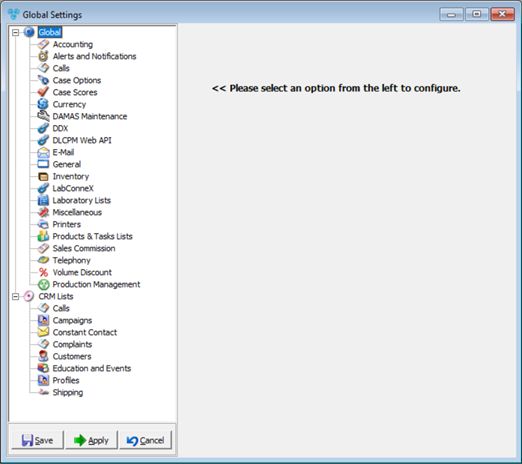
V12 - Global Settings

Global Settings


Global Options:


➢Accounting

•Accounts receivable

•Quick Books

•Lock Box

•E-mail

•Tax Integration

oTax Clases

➢Alerts and Notifications

➢Calls              

➢Case Options

•Case Entry

•Case Invoicing

•Shipping

•Try In Invoicing

•Case Scheduling

•Follow-Up Call

➢Case Scores

➢Currency

➢DAMAS Maintenance

•Buildings

•Location

•Equipment

•Procedures

➢DDX

➢LabConnex

➢E-mail

•SMTP

•Retrieve E-mail

➢General

➢Inventory

•Item Categories

•Item Types

•Inventory Items

•Adjustment Reason

•Units of Measure

•Manufacturers

➢Laboratory Lists

•Laboratories          

•Preferences  

•Discounts          

•Remakes        

•Reasons

•Enclosures

•Holidays

•Case Statuses

•Case Locations

•QC Ratings

•GL Accounts

•Surcharge Reasons

•Out of Order Reasons

•QB Inventory Sites

•Vacation Reasons

•Equipment Types

•Equipment

•Teams

•Tax Groups

•Tax Rates

•Medical Excise Tax

➢Miscellaneous

•Document Scanning Types

•Corporate Directory

•Report Forms

•TimeClock Activities

•Common Notes

➢Printers

➢Products & Tasks Lists

•Products              

•Catalog Products  

•Materials          

•RX Categories

•RX Design

•Shades

•Translucencies

•API Applications

•Production Methods

•Production Tasks

•Task Groups

•Task Types

•Tasks Checkpoint

•Pay Rate Codes

•Metal Finish

•Departments                            

•Types                            

•Groups                                

•Sub-Groups

•Categories

•Lot Numbers

•Digital Scanner

➢Sales Commission

➢Telephony

➢Volume Discount

➢Production Management