Dental Lab Customer & Production Management

Products & Tasks Lists

Products & Tasks Lists

Previous topic Next topic  

Products & Tasks Lists

Previous topic Next topic  

Usage:

In order to use a Product in a case you need to add the product to DLCPM database first. To do that you need several predefined pieces of information such as: Product Type, Method and Tasks to complete the Products. All these and much more are defined in Products and Tasks Lists menus.  


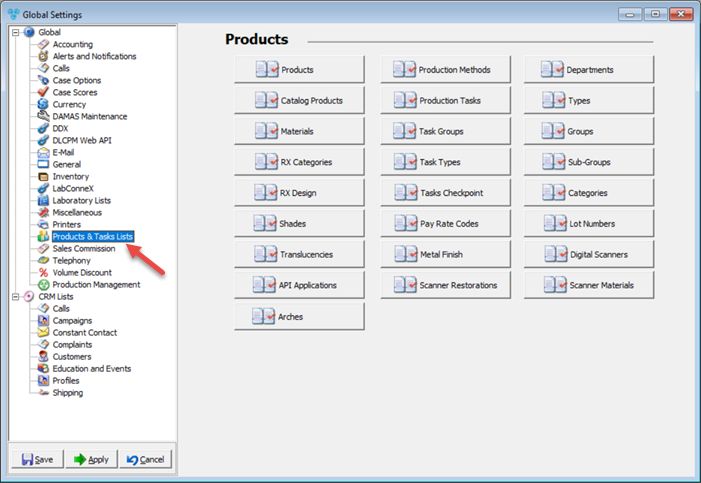
Navigation:             File > Global Settings > Global > Products & Tasks Lists  


Products & Tasks Lists menus    

•Products                      

•Catalog Products    

•Materials

•RX Categories

•RX Design

•Shades

•Translucencies

•API Applications

•Arches

•Production Methods

•Production Tasks

•Task Groups

•Task Types

•Tasks Checkpoint

•Pay Rate Codes

•Metal Finish

•Scanner Restorations

•Departments                          

•Types                            

•Groups                                

•Sub-Groups

•Categories

•Lot Numbers

•Digital Scanner

•Scanner Materials

V12 - Products and Tasks Lists

Products and Tasks Lists form