Add and maintain Tool Product |

|

|
|
Add and maintain Tool Product |
|
|
Add and maintain Tool Product |
|
|
|
Add and maintain Tool Product |
|
|
Usage:
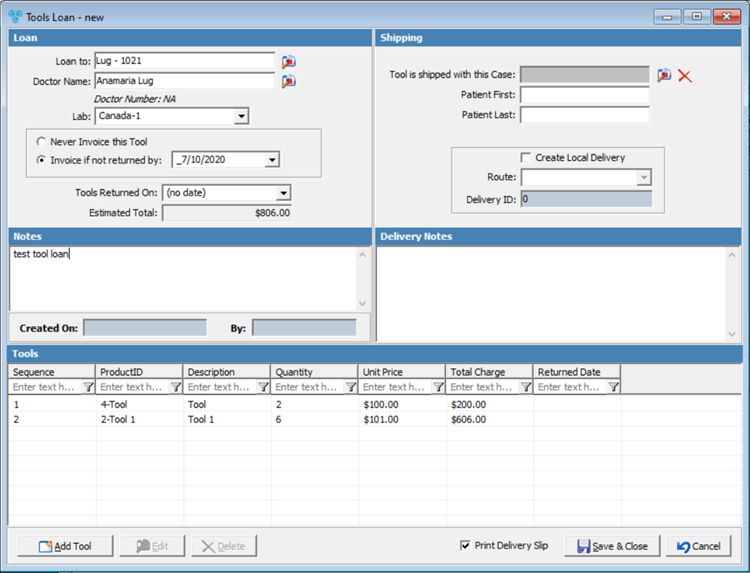
A given tool loan record may have multiple tools. On the File > Global Settings > Global > Products & Tasks Lists > Products form, a check box called This Product is a Tool has been added. When entering a new tool loan, only products with the box checked for tool are displayed .
Navigation: Open Tools Loan form in order to add or edit Loan, or to navigate to Tool Manager form and add products without opening the existing Loan.
•You may access the Loan Tool form by several navigation paths:
➢Customer > Loan Tool
➢Customer > Cases > Right Click > Loan Tool
➢Customer > Cases > Tools Loan tab > 
➢Customer > Cases > Tools Loan tab > 
➢Case Finder > Tools Loan tab >
➢Case Finder > Tools Loan tab >
➢Tools > Tool Manager >  New Tool Loan
➢Tools > Tool Manager >  Edit Tool Loan
•Add Products on Tool Manager form
➢Tools > Tool Manager > Products tab
1.Open Loan Tool form (Please read here more info about how to Add a Loan Tool record)
Tools Loan Form 2.Click on
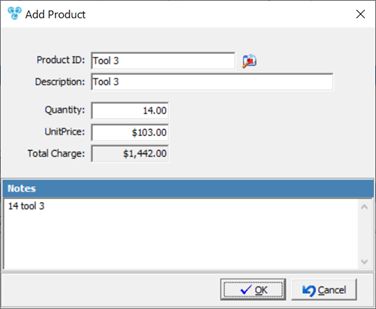
Add Product Tool 3.Click on Please Note: Only Products with the check box called This Product is a Tool checked on the File > Global Settings > Global > Products & Tasks Lists > Products form are available. 4.Enter Quantity 5.Enter Notes. 6.Click |
1.Open Loan Tool form (Please read here about how to Add a Loan Tool record, and here about how to Add Loan Product)
Tools Loan Form 2.Click on the Product record you want to update 3.Click on
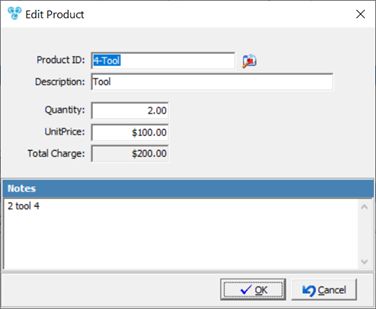
Edit Product Tool 4.Make necessary updates on Edit Product form. 5.Click |
1.Open Loan Tool form (Please read here about how to Add a Loan Tool record, and here about how to Add Loan Product)
Tools Loan Form 2.Click on the Product record you want to remove. 3.Click on 4.Product is removed. |
 Add Product Tools on Tool Manager form
1.Navigate to Tools > Tool Manager (Please read here about how to Add a Loan Tool record)
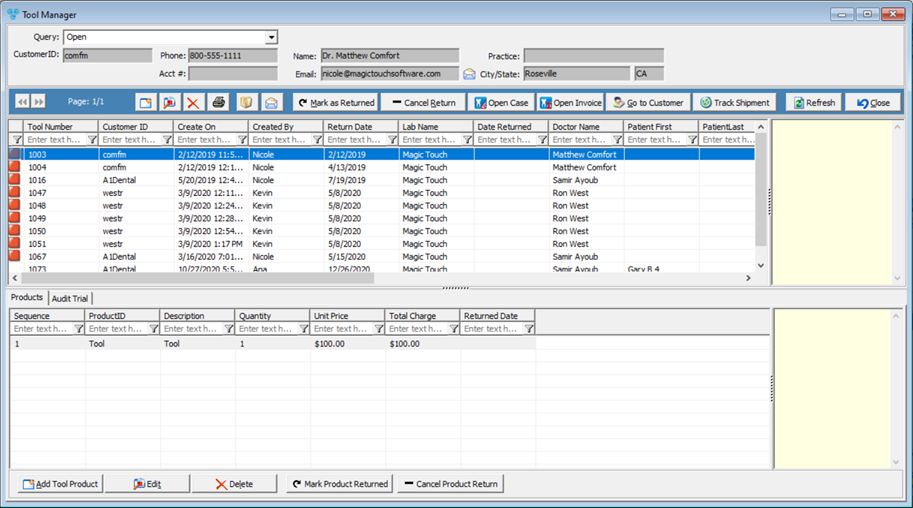
Tool Manager form 2.Select the Tool Number for which you want to add Products 3.Click on
Add Product Tool 4.Click on Please Note: Only Products with the check box called This Product is a Tool checked on the File > Global Settings > Global > Products & Tasks Lists > Products form are available. 5.Enter Quantity 6.Enter Notes. 7.Click |
1.Navigate to Tools > Tool Manager (Please read here about how to Add a Loan Tool record, and here about how to Add Loan Product)
Tool Manager form 2.Select the Tool Number for which you want to edit Product. 3.Select the Product you want to update on Products tab 4.Click on
Edit Product Tool 5.Make necessary updates on Edit Product form. 6.Click |
1.Navigate to Tools > Tool Manager (Please read here about how to Add a Loan Tool record, and here about how to Add Loan Product)
Tool Manager form 2.Select the Tool Number from which you want to remove Products 3.Click on the Product record you want to remove. 4.Click on 5.Product is removed. |
See also: