Settings |

|

|
|
Settings |
|
|
Settings |
|
|
|
Settings |
|
|
Usage:
If you are a Milling Center and receiving cases from other labs or doctors, your customers can send you a case directly from their DLCPM enabled system. While this is possible using the Customer Portal, LabConneX eliminates the double entry and provides full 2 way communication between you and your customers.
Navigation: File > Global Settings > Global > LabConnex > Settings
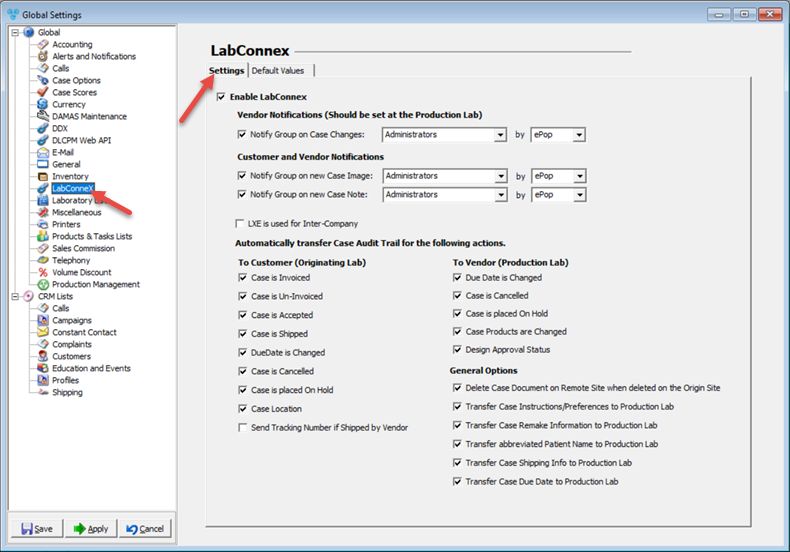
LabConnex - Settings tab
1.First option is to Enable LabConnex.
2.Next there are several notification options that can be selected depending on how you wish to set up your account:
➢Vendor Notification (Should be set at the Production Lab)
•Notify Group on Case Change - select Group and notification method from the dropdown.
➢ Customer and Vendor notifications:
•Notify Group on New Case Image - select Group and notification method from the dropdown.
•Notify Group on new Case Note - select Group and notification method from the dropdown.
•LXE is used for Iner-Company only - All "Case Audit Trail" transactions will be transferred.
3.Automatically transfer Case Audit Trail for the following actions:
➢To Customer (Originating Tab):
•Case is Invoiced
•Case is Un-Invoiced
•Case is Accepted
•Case is Shipped
•DueDate is changed
•Case is Cancelled
•Case is On Hold
•Case Location
• Send Tracking Number is Shipped by Vendor
➢ To Vendor (Production Lab):
•DueDate is changed
•Case is Cancelled
•Case is placed On Hold
•Case Products are Changed
•Design Approval Status
➢ General options
•Delete Case Document on Remote Site when deleted on the Origin Site - if you wish that documents will be removed once these are deleted on the origin site.
•Transfer Case Instructions/Preferences to Production Lab.
•Transfer Case Remake Information to Production Lab - When set, the following information is transferred only: Reason, regardless of value and Original Case Number (Remote Case Number), if available.
•Transfer abbreviate Patient Name to Production Lab.
•Transfer Case Shipping Info to Production Lab.
See also: